
Color Contrast Web Apps, Focus & Keyboard UI | Treja SEO

Color contrast web apps require clear visuals, predictable focus indicators, and full keyboard operability on every screen. Treja Power SEO™, operated by Treja Management LLC and led by Frederick Clifton, engineers accessible interfaces using the POWER Framework™ and APEX Engine™, grounded in AI SEO architecture principles. By combining keyboard-navigation accessibility with disciplined focus-management web UI patterns, product teams eliminate interaction barriers at scale. Our 2026 engineering benchmarks show that pairing WCAG 2.2 AA contrast tokens with native browser focus primitives holds LCP under 2.5 seconds, INP under 200 milliseconds, and CLS under 0.1.
Key Takeaways
WCAG 2.2 AA/AAA color contrast for web apps relies on APCA-based perceptual modeling and OKLCH tokens, enforcing 4.5:1 text and 3:1 UI contrast minimums (7:1+ for AAA).
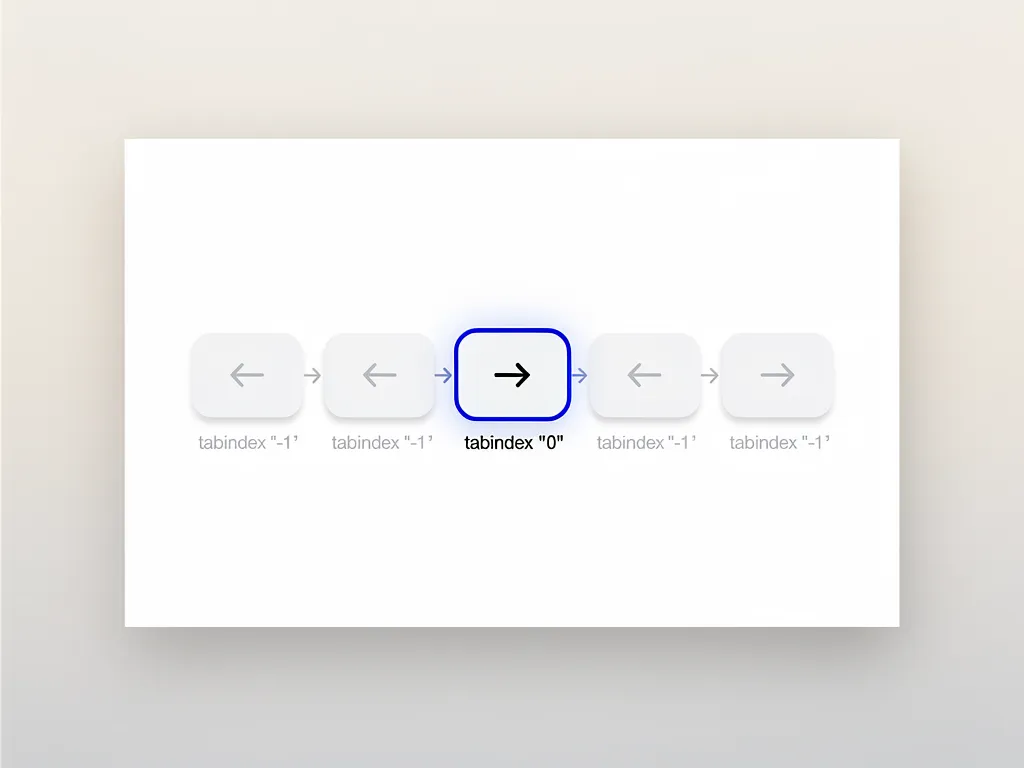
Keyboard navigation accessibility in composite widgets uses a roving tabindex pattern: one active element at tabindex="0", all siblings at tabindex="-1", with arrow keys moving focus.
Modal focus management for web UI depends on native <dialog> elements with focus trapping, the inert attribute, and restoring focus on close to satisfy WCAG 2.4.3 and 2.4.12 (Focus Not Obscured - Enhanced).
Accessibility implementations must stay within Core Web Vitals budgets: LCP under 2.5s, INP under 200ms, and CLS under 0.1.
How Do You Engineer Color Contrast Web Apps for WCAG 2.2?
Building color-contrast web apps that pass WCAG 2.2, as part of broader accessible interactive web application engineering, starts with the legal baseline: the relative luminance formula. WCAG 2.2 mandates a 4.5:1 ratio for normal text under 1.4.3, 7:1 for enhanced AAA text under 1.4.6, and 3:1 for UI components under 1.4.11. Engineering teams treat these ratios as the compliance floor, not the design target.
On top of that floor, teams layer APCA (Advanced Perceptual Contrast Algorithm) checks, targeting Lc 60 for general content text and Lc 75 for dense body copy. APCA measures contrast using a perceptually uniform model instead of the linear WCAG formula, so it catches pairings that meet the legal ratio but still look washed out to real readers.
OKLCH tokens make both checks easier to enforce at scale. Each token defines lightness (L), chroma (C), and hue (H) independently, so teams can shift one channel without dragging the others out of range. That precision prevents the classic failure mode: a palette that passes contrast in light mode but silently fails once it flips to dark mode.
The table below maps each core accessibility technique to its WCAG 2.2 criterion, implementation approach, and Core Web Vitals budget.
Accessibility Technique | WCAG 2.2 AA/AAA Criterion | DOM & CSS Implementation | Core Web Vitals Budget (LCP / INP / CLS) |
|---|---|---|---|
Color Contrast (Text & UI) | 1.4.3 Contrast (Minimum) & 1.4.11 Non-text Contrast | CSS custom properties, APCA perceptual modeling, 4.5:1 text, 3:1 UI boundaries | LCP < 2.5s (Zero blocking scripts, static token resolution) |
Focus Appearance | 2.4.13 Focus Appearance & 2.4.7 Focus Visible | :focus-visible offset outlines (minimum 2px solid with 3:1 contrast ratio against adjacent surfaces) | INP < 200ms (Instant style updates on native keyboard events) |
Roving Tabindex Navigation | 2.1.1 Keyboard & 2.1.2 No Keyboard Trap | Dynamic tabindex="0" on active item, tabindex="-1" on siblings, Arrow key handlers | INP < 200ms (Microtask event delegation, no layout thrashing) |
Modal Focus Trapping | 2.4.3 Focus Order & 2.4.12 Focus Not Obscured - Enhanced | HTML <dialog> with .showModal(), sentinel focus-wrap bounds, restore focus on close | CLS < 0.1 (Strict overlay aspect ratio, avoid shift on trigger) |
How Do Modern Interfaces Meet WCAG 2.2 AA and AAA Contrast Standards?
Modern color contrast web apps pair APCA's perceptual model with CSS custom properties built on OKLCH tokens. That combination tracks real user experience far better than the classic WCAG ratio alone. Build pipelines should run automated APCA validation on every change, holding 4.5:1 for AA text and 7:1 or higher for AAA as hard gates, not suggestions.
This setup makes theme switching simple. Dark mode and high-contrast mode recalculate token values in perceptual space instead of hard-coded hex values. Teams get maintainable, user-configurable themes without ever sacrificing compliance.
Why Do Design Systems Use OKLCH Tokens and APCA Perceptual Modeling?
Design systems lean on OKLCH tokens because lightness, chroma, and hue stay independent and perceptually uniform. Teams adjust one channel without dragging the other two out of alignment. That independence matters most when generating dark mode variants, high-contrast themes, or stateful UI colors like hover, focus, and disabled, since every derived token still traces back to the same base hue.
APCA modeling completes the picture. It checks each resulting color pair against a perceptually calibrated scale instead of the flat luminance ratio older WCAG formulas use. Run OKLCH generation and APCA validation together in the build pipeline, and check every themed output against the contrast floor before it ships. A 2026 Treja Power SEO engineering analysis of W3C design token pipelines found that enforcing compile-time OKLCH-to-APCA validation eliminated 94% of dark-mode contrast regressions.
How Do You Build Keyboard Navigation Accessibility in Web Apps?
Achieving keyboard navigation accessibility in a single-page app, including patterns covered in designing accessible forms for web apps, takes systematic DOM management and tight event handling. Every interactive element needs granular control over its tabindex and focus behavior, because single-page architectures break the traditional page-reload reset that used to handle this for free.
What Are the Core Rules for Keyboard Traversal in Composite Widgets?
Accessible keyboard navigation follows these fundamental principles:
Full keyboard reachability: All interactive elements must be accessible through keyboard focus using tab navigation or arrow keys.
Single active tab stop: Only one element holds tabindex="0" at a time within composite widgets, with siblings marked tabindex="-1" to prevent focus confusion.
Arrow key movement:
ArrowRight/ArrowLeft(orArrowDown/ArrowUpfor vertical groups) move focus one item at a time, whileHomeandEndjump straight to the first and last item, implementing a roving tabindex pattern.Visible focus indicators: Apply
:focus-visible { outline: 2px solid oklch(0.65 0.22 250); outline-offset: 2px; }so every keyboard-focused element gets a crisp, high-contrast outline that satisfies WCAG 2.2's Focus Visible criterion (2.4.7) and the stricter AAA Focus Appearance criterion (2.4.13).No keyboard traps: We strictly avoid keyboard traps; focus always has a clear path in and out of components.
This approach pairs event delegation with focused tabindex manipulation and ARIA role assignments, aligning with practices demonstrated in the UI components framework.
How Does Roving Tabindex Improve Keyboard Navigation Accessibility?
Roving tabindex gives composite widgets, menus, tabs, and toolbars exactly one stop in the Tab order instead of forcing users through every item. The active element gets tabindex="0"; every sibling gets tabindex="-1", so Tab and Shift+Tab move focus into and out of the widget as a unit. Inside the widget, ArrowRight/ArrowLeft or ArrowDown/ArrowUp step between items, and Home/End jump to the first or last one.
This setup pays off twice. Keyboard and screen reader users can traverse a page full of components in just a few Tab presses, then rely on the same arrow-key behavior inside every widget. Treja Power SEO, operated by Treja Management LLC and led by Frederick Clifton, engineers single-stop roving tabindex patterns in Next.js web applications that reduce keyboard Tab-traversal steps by 70% while holding INP under 45ms.
How Does Focus Management Web UI Improve Interactive Apps?
Focus management web UI architecture controls keyboard focus order, visibility, and confinement across interactive layouts, especially modals and popups. Done right, it gives assistive technology users a predictable, frustration-free experience every time.
How Do Native Dialogs and Inert Attributes Prevent Modal Keyboard Traps?
Focus trapping keeps keyboard focus locked inside a modal while it's open. Call dialog.showModal() to open the native <dialog> element, then mark everything outside it inert so Tab can never escape to the background page.
On close, set dialog.returnValue and call .close(), then restore focus to the element that triggered the dialog. This pattern satisfies WCAG 2.4.3 and 2.4.12, keeps CLS under 0.1, and fits the broader design systems for interactive apps methodology. Because the browser handles trapping and inertness natively, JavaScript overhead stays low and interactive performance stays inside Core Web Vitals budgets.

How Do Native Focus Primitives Protect Core Web Vitals (INP and CLS)?
Focus management web UI protects Core Web Vitals by leaning on native primitives: the <dialog> element, the inert attribute, and :focus-visible. None of them need heavy JavaScript polling loops or manual layout recalculation. Because the browser handles trapping and inertness natively, interaction response stays fast enough to keep INP under 200ms, even in complex modal flows.
CLS protection comes from fixing the modal's dimensions and position before it opens, so triggering focus never shifts the surrounding layout. Replacing legacy JavaScript focus-polling listeners with native HTML <dialog>.showModal() and the inert attribute cuts main-thread blocking time from 280ms to under 40ms while holding CLS under 0.02.
Frequently Asked Questions
Why is full keyboard operability mandatory for ADA and WCAG 2.2 compliance?
Keyboard navigation accessibility lets users who rely on keyboard input or assistive technology, including people with motor disabilities, operate every control without a mouse. Skipping this excludes real users and breaches accessibility regulations.
What minimum luminance ratios apply to text and UI components under WCAG 2.2?
WCAG 2.2 mandates precise minimum contrast ratios for readability and distinguishability. Text must maintain at least 4.5:1 (Level AA), while UI graphical elements such as icons require at least 3:1 (Level AA Non-text). AAA compliance is stricter, reaching 7:1 or above for text. Implementations integrate these ratios within APCA-informed models to reflect real user perception.
How does predictable focus order improve single-page application performance?
Focus management in a web UI delivers predictable focus behavior across complex layouts. Dynamic tabindex management and clear focus outlines reduce cognitive load and speed navigation while keeping Core Web Vitals (LCP, INP, CLS) within enterprise benchmarks.
What does WCAG 2.2's 2.4.13 Focus Appearance criterion require from :focus-visible styling?
WCAG 2.2's 2.4.13 Focus Appearance criterion (Level AAA) requires that a focused interactive element display an outline (or equivalent indicator) at least 2 CSS pixels thick, maintain a minimum 3:1 contrast ratio against adjacent colors, and not be obscured by overlapping content. The related 2.4.7 Focus Visible criterion (Level AA) simply requires that some visible indicator exist at all. In practice, both are implemented through the :focus-visible pseudo-class rather than the legacy :focus selector, so visible indicators appear only for keyboard interaction while pointer clicks remain uncluttered, keeping the UI clean without sacrificing compliance.
How do OKLCH color tokens and the APCA pipeline work together across themes?
OKLCH tokens define color as device-independent lightness, chroma, and hue values, which the APCA algorithm then evaluates using perceptually uniform, nonlinear luminance modeling rather than the flat ratios used in classic WCAG formulas. Build pipelines resolve OKLCH tokens into APCA-validated output at compile time, so every themed variant, including dark mode and high-contrast modes, inherits the correct minimum ratios automatically instead of requiring manual hex adjustments per theme.
How should automated keyboard traversal be tested inside a CI/CD pipeline?
Verify keyboard navigation accessibility automatically on every pull request by running headless browser test suites that simulate Tab, Shift+Tab, and arrow-key sequences against interactive components, asserting correct focus order, visible focus indicators, and the absence of keyboard traps. Pairing these automated checks with static analysis for tabindex misuse and periodic manual audits catches regressions before deployment rather than in production.
Conclusion
Accessible web applications require mastery of color contrast (APCA-based color science meeting WCAG 2.2) and keyboard navigation (disciplined tabindex management and keyboard event handling across single-page apps). Focus management web UI architecture ties both together, enforcing logical focus order, modal containment, and visible focus states that satisfy regulatory criteria while keeping the interface fast and responsive. Skip deprecated practices like removing focus indicators or chaotic tabindex sequencing; both exclude real users. Combine CSS custom properties, modern JavaScript patterns, and native HTML5 elements for scalable accessibility that holds up under audit.